How Do I Control Whether Businesses Can Edit Agent Behavior in Kickcall?
Control business-side access to agent prompts, call flows, routing, tone and escalation in Kickcall, and review which fields remain editable
Written By Maruf Ansari
Last updated 9 days ago
Agent Behavior Edit Permissions Overview
Agent Behavior Edit Permissions allows Agency users to control whether a Business can modify its AI Agent's behavior through the Agent Builder. When enabled, the Business can edit settings that affect Agent behavior. When disabled, behavior-related settings become read-only, while certain other fields remain editable. This helps Agencies manage Business editing permissions, protect existing Agent configurations, and prevent unintended changes to Agent behavior.
Important notes
Even a small wording change can affect greetings, qualification, routing, escalation or closing on live calls. Keep this toggle Off unless the person making changes understands prompt design and Agent Builder behavior.
Non-technical direct Business users should not change workflows. They should raise a ticket with the Agency support team for investigation instead.
Before you start
Open the intended Business’s configuration and verify its Business Code.
Decide who owns Agent quality and workflow changes at the Agency.
Set the behavior-edit permission
Locate Allow Agent Behavior Changes on the Business Profile Settings page.
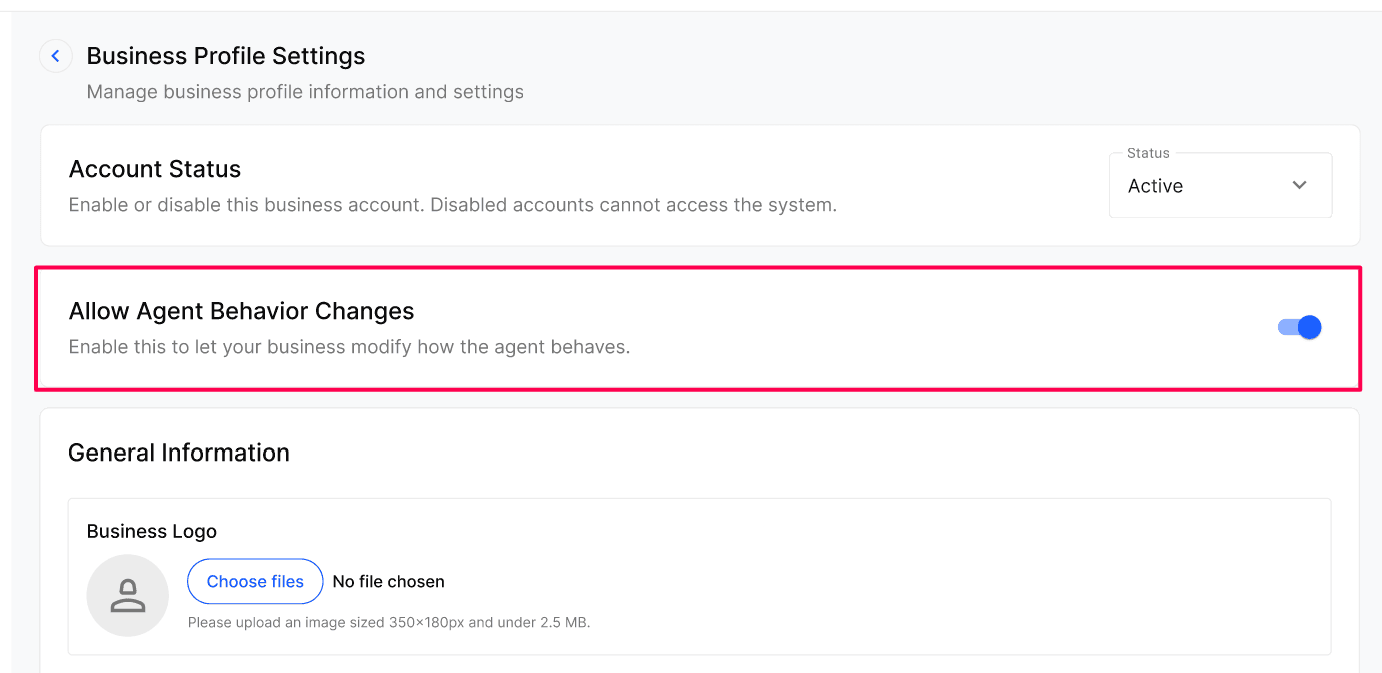
Set the toggle On to allow behavior edits or Off to make the behavior layer read-only.
Verify the Business’s Agent Builder access and review the permission change in Audit Trails.
Expected result
With the toggle Off, the Business can inspect but not edit Agent behavior. The running Agent keeps its current behavior and basic settings remain editable. With it On, the Business can edit the behavior layer.
Verify the result
Review the intended Business’s Agent Builder access through the permitted Business view.
When Off, verify the behavior layer is read-only and the existing Agent still handles a controlled test call as expected.
Review Audit Trails for the permission change and any later Builder edits.
Troubleshooting
Frequently Asked Questions
Will turning it Off break anything the Business is already doing?
Will turning it Off break anything the Business is already doing?
No. The agent keeps running with its current behaviour. Only the ability to edit that behaviour is removed.
Should I give my internal team this access by default?
Should I give my internal team this access by default?
Only if they truly understand prompt engineering and how the Agent Builder works. Otherwise, keep it Off and route behavior changes through whoever owns agent quality at your Agency.
Should every internal team member receive behavior-edit access?
Should every internal team member receive behavior-edit access?
No. Give access only to people who understand prompt design and Agent Builder behavior; otherwise use the Agency’s Agent-quality owner.
Are changes to this permission audited?
Are changes to this permission audited?
Yes. Toggling the permission is recorded in Agency’s Audit Trials, and every subsequent Builder edit made by a Business, is recorded in Business’s Audit Trails.
What should a non-technical Business user do instead of editing workflows?
What should a non-technical Business user do instead of editing workflows?
Raise a ticket with the Agency support team so it can investigate and make controlled changes.
Related articles
Was this helpful?
Still need help? Ask the team