SIP Registration Guide

Written By Maruf Ansari

Last updated 14 days ago

With SIP Registration, your agent behaves like a SIP device — the same way a desk phone or softphone would — by logging in to your phone system and keeping that login active. Your phone system issues the login details; your agent uses them to register and stay reachable.

This method is the right choice when your phone system or provider doesn't support trunk-style routing and instead issues you device-style SIP credentials — common with some legacy on-premise PBXs and extension-based providers.

Part of SIP Connectivity. SIP Registration is one of two ways to set up SIP Connectivity. If you haven't decided yet, see the SIP Connectivity Overview for a full comparison — in most cases SIP Trunking is the recommended method, with SIP Registration reserved for phone systems that specifically require it.

How this compares to SIP Trunking

Aspect

SIP Registration

SIP Trunking

How it connects

Your agent registers itself to your PBX/provider, using a persistent login that must stay active.

A direct, server-to-server connection — by trusted IP address or SIP credentials on each call.

Connection state

Stateful — relies on a live registration that renews periodically.

Stateless — no ongoing session to maintain.

Best fit

Systems that only support device-style registration, e.g. legacy PBXs or extension-based providers with no static IP.

Enterprise PBXs, SBCs, and carriers that support trunk-style routing (most modern business phone systems).

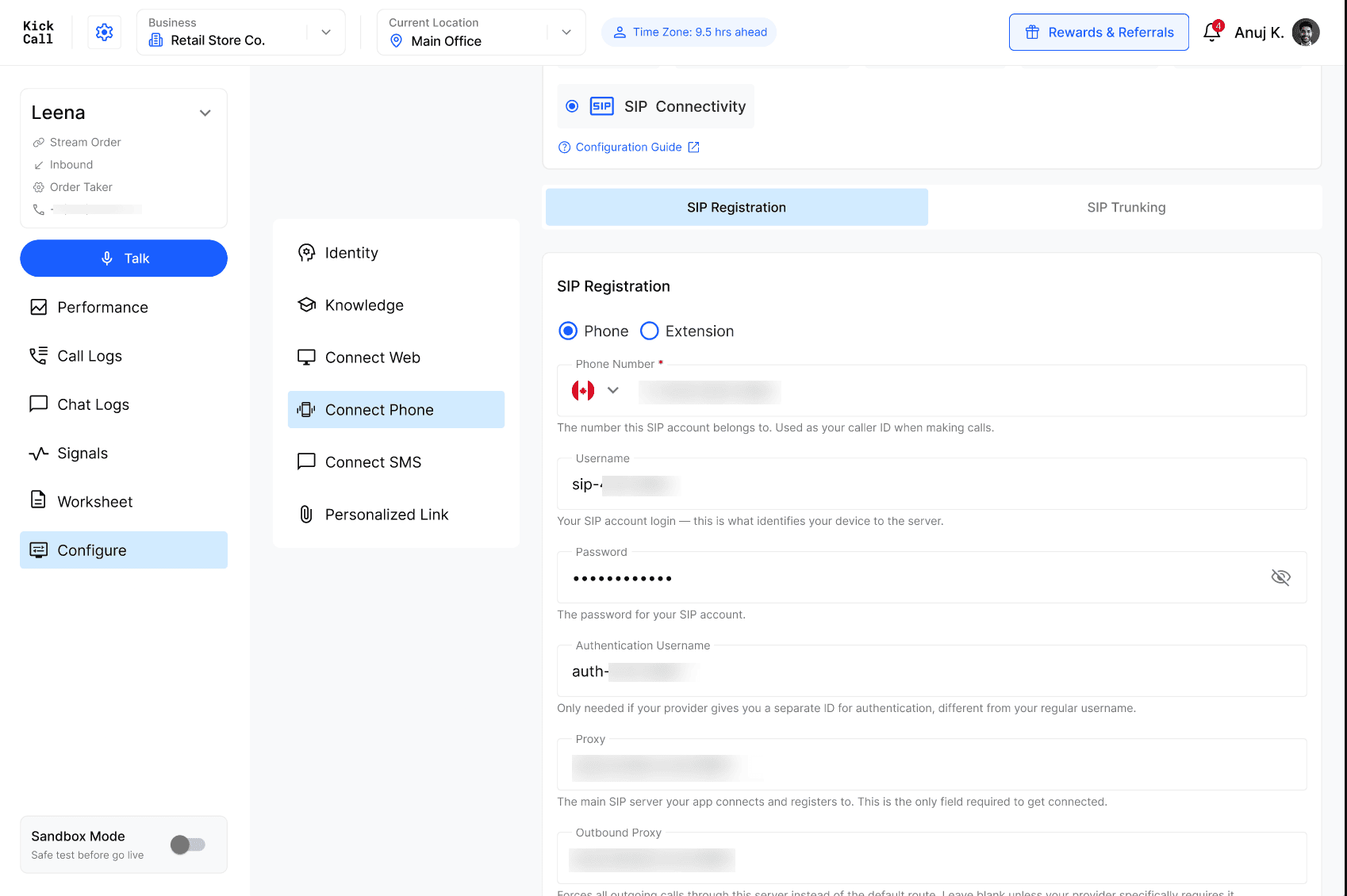
Registration fields

Field

Purpose

Phone / Extension

Choose whether this SIP account is identified by a Phone Number or an Extension Number — this is the destination that calls to this registered device will be routed to. The two options are independent of every other field on this form: switching between them only changes which field below you fill in.

Phone Number

Shown when Phone is selected. The phone number that is the destination for calls to this registered device.

Extension Number

Shown when Extension is selected. The extension number that is the destination for calls to this registered device.

Username

Your SIP account login — this is what identifies your device to the server.

Password

The password for your SIP account.

Authentication Username (optional)

Only needed if your provider gives you a separate ID for authentication, different from your regular username.

Proxy

The main SIP server your app connects and registers to — this is the only field required to get connected.

Outbound Proxy (optional)

Forces all outgoing calls through this server instead of the default route. Leave blank unless your provider specifically requires it.

Realm (optional)

Used only during login/authentication to verify your credentials. Usually the same as your Proxy address — leave blank to auto-detect.

From Domain (optional)

The domain shown to the other party when you make a call. Usually the same as your Proxy address — leave blank to auto-detect.

SIP Registration — field layout with Proxy, Outbound Proxy, Realm, and From Domain

Keep the registration alive. Because this method relies on an active login rather than a stateless trunk, if your phone system changes these credentials or the registration lapses, inbound and outbound calls will stop working until it's reconnected.


Frequently Asked Questions


More in SIP Connectivity