Changelog

Follow new updates and improvements to Kickcall AI.

📋 Smarter onboarding tracking, plus more control over your agency’s pricing and setup
New Enhancements: Onboarding Pipeline Upgrades

An onboarding that quietly sits for two weeks can cost you a customer. Every onboarding now shows how long it has been in its current stage. You can also flag the ones blocked on engineering, and lost or stale records no longer clutter your list.
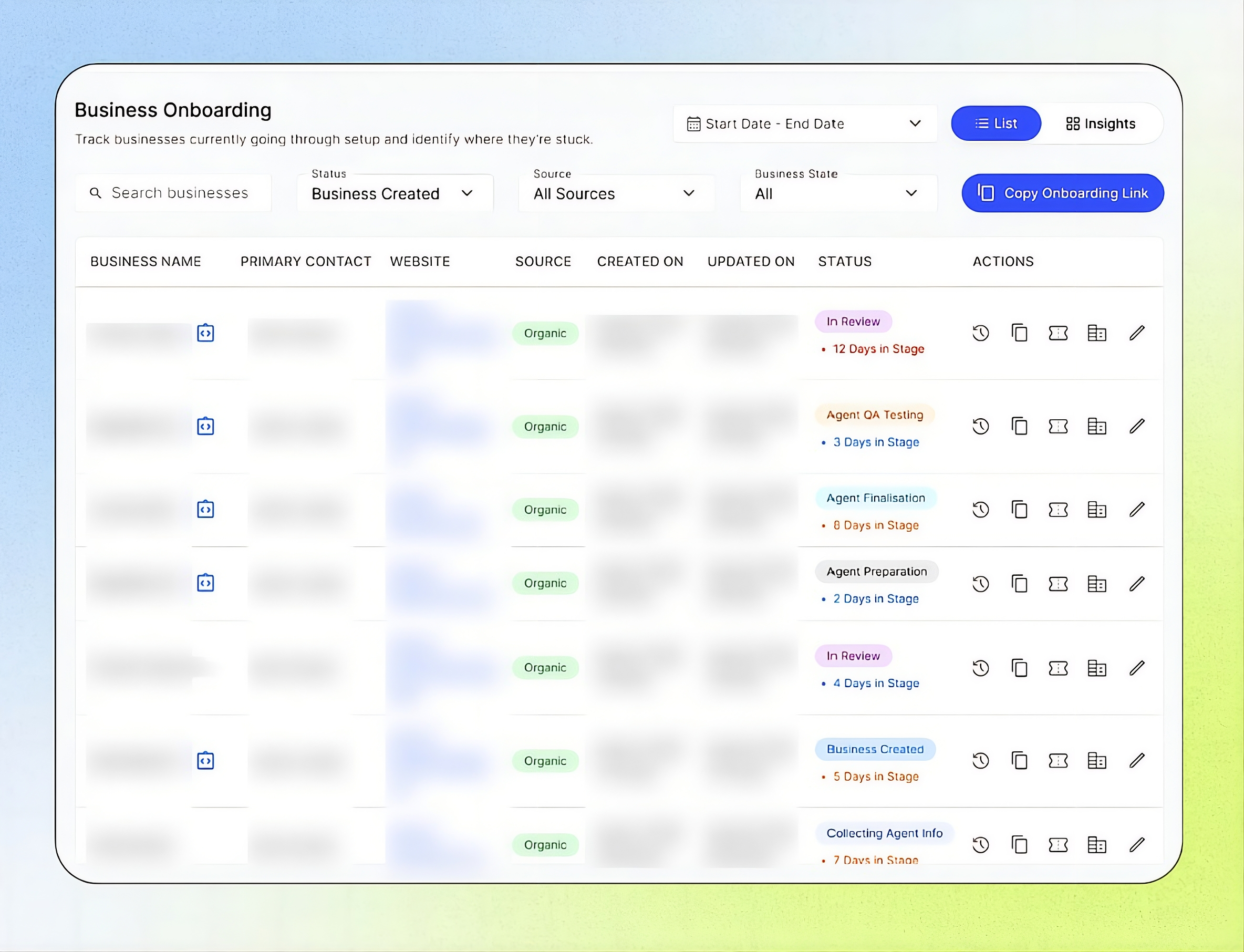
What’s New:

  • New Awaiting Engineering status: Flag an onboarding that’s waiting on engineering work, like a custom integration or a telephony provisioning issue, before Business Setup. It’s the only manual status you can set before the Business is created, so your team always knows why an onboarding hasn’t moved. See Onboarding Statuses.

  • Days in Stage on every status: A counter under each status badge shows how many days the onboarding has been in its current stage, and it resets whenever the status changes. The counter turns from blue to orange to red the longer an onboarding sits, so the ones that need a follow-up stand out right away. See All Onboardings & Actions.

  • Lost on Onboarding now cleans up after itself: When you mark an onboarding as Lost on Onboarding, the Business created for it is automatically deleted from the Businesses module. The onboarding record stays for future reference, and you confirm the change by typing the Business’s exact name, so nothing gets removed by accident. See Internal Process.

  • Archive onboarding records: Archive completed, cancelled or stale onboardings to keep your active list focused. Archived records keep their history log, ticket references and audit events, and you can still find them through search and filters.

Impact Created:
Stuck onboardings surface on their own instead of waiting for someone to notice. Your team knows which businesses need a nudge today and why an onboarding is on hold. Lost deals also no longer leave unused Businesses behind in your account.

For more details, see Onboard a Business from Form Intake to Go-Live.


Enhancements

  • Offer Concurrency Limit as an add-on: Businesses can now buy extra simultaneous call capacity from their Add-ons page, so callers don’t hit a busy line at peak times. Turn on Offer this Add-On in Add-on Pricing and set the setup fee and the additional price per concurrency. Businesses can raise or lower their limit anytime, and the extra capacity applies across all their numbers and AI agents. Charges are prorated for the current billing cycle, and lowering the limit takes effect on the next cycle.

  • Choose your own notifications: Notification Preferences now lets you turn each Agency Portal alert on or off, separately for In-App and Email. Choose alerts for events such as Business Onboarding Payment Received, Onboarding Form In Review, Business Monthly Billing Failed, Integration Synchronisation Failed, Business Status Changed, and Engine Update Available. Each toggle saves instantly, and your choices don’t change what your teammates receive.

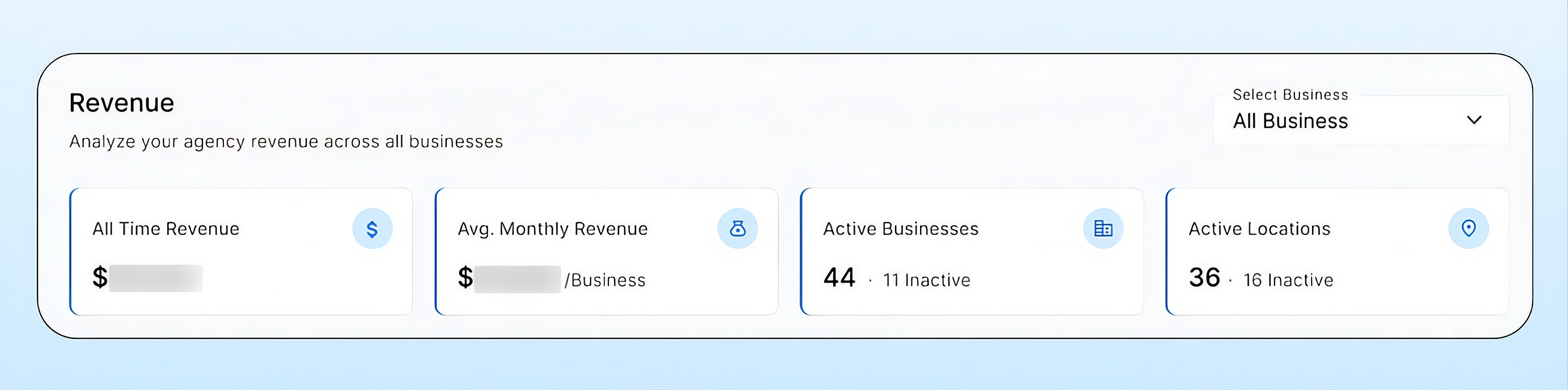
  • New cards at the top of the Revenue dashboard: See All Time Revenue, Avg. Monthly Revenue, Active Businesses, and Active Locations the moment you open the page. Active Businesses and Active Locations show the inactive count beside them, so you can compare at a glance. Pick a single business from the filter and every card, chart, and table updates to match.
  • Total discount cap on coupons: Percentage coupons can now carry a Total amount, a maximum discount spread across billing cycles. Each cycle’s discount is taken from the pool, and once it reaches $0 the Business pays full price. For example, a 50% off coupon with a $400 cap keeps discounting month after month until the $400 is used up, so long-running promos never cost more than you planned.

  • More inclusions in Business Packages: Packages now include Concurrency per location, AI Tokens, and SMS Segments, each with an included amount and its own rate for usage above that amount. Edits apply going forward and appear on the next month-end bill.

  • A cleaner, better organized Agency Portal navigation: The sidebar is now grouped into clear sections: Customers, Insights, Services and Platform, so you can find what you need faster. Configuration now opens a menu split into Whitelabel & Setup and Agency Only, and Coupons, API Keys and Webhooks have moved there. All your setup now lives in one place.
NewAgency

📞 Decide how many calls each location can handle, plus new notification alerts and Do Not Call controls

New Feature: Concurrency Settings

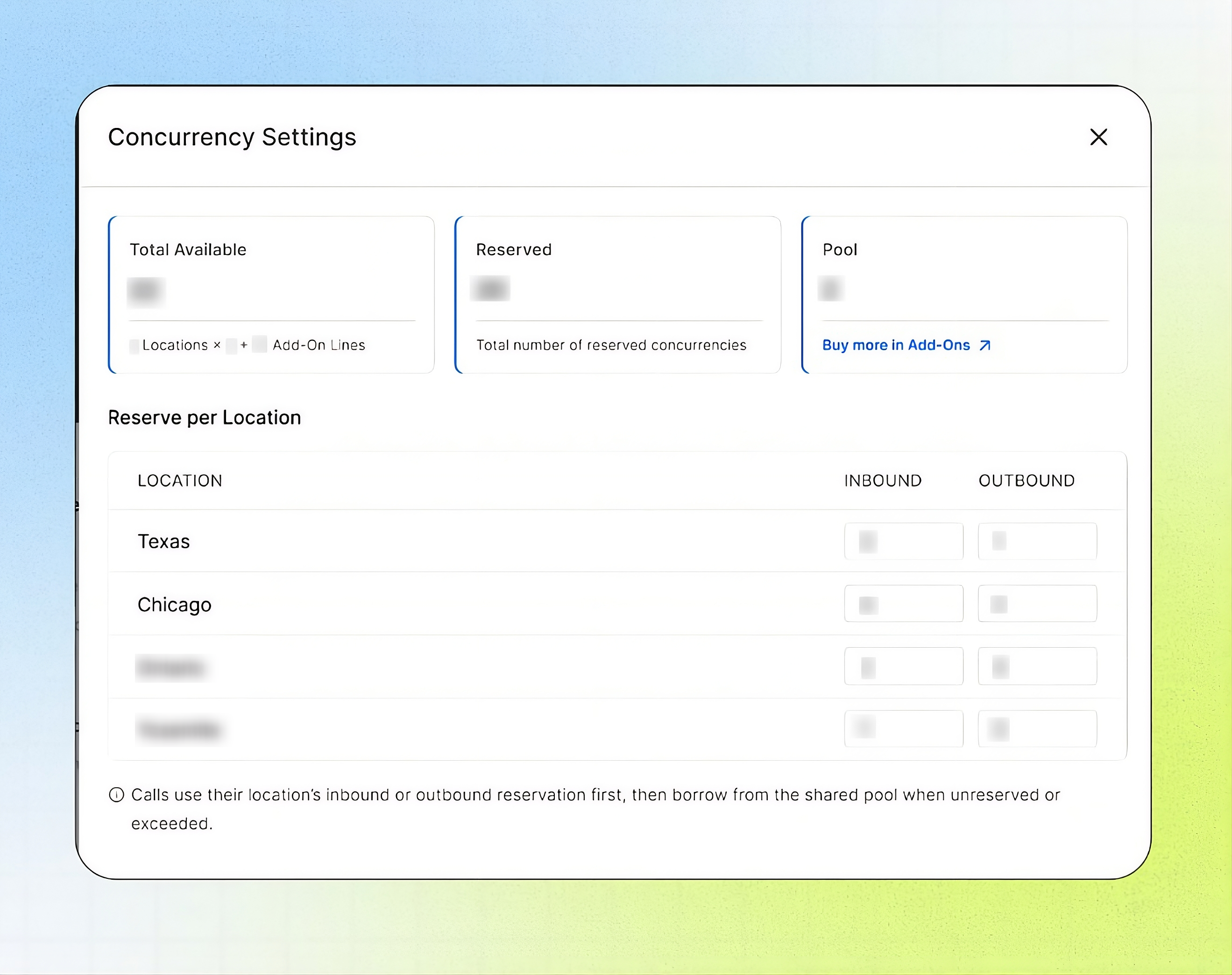
One busy location shouldn’t mean busy signals for its callers. Concurrency Settings lets you decide how many calls each location can handle at the same time, and keeps spare capacity ready for whichever location needs it.

What’s New:

  • Reserve calls for each location: Set how many inbound calls and how many outbound calls every location can handle at once. Give your busiest office more room and your quieter ones less.

  • Three numbers, one screen: Total Available shows every concurrent call you have, Reserved shows what you’ve assigned to locations, and Pool shows what’s left over for anyone to use.

  • A shared pool for the rush: Calls use their own location’s reservation first. If that’s full, they borrow from the pool, so a sudden spike at one location doesn’t turn callers away while another location sits idle.

  • Add more lines when you need them: Need more capacity overall? Activate the Concurrency Limit add-on straight from the Pool card. The extra lines apply across all your numbers and AI agents, and you can raise or lower the limit anytime.

  • Easy to find: Open Locations and select the settings icon next to Add Locations.

Impact Created:
Callers at your busiest location stop hitting a busy line while capacity goes unused elsewhere. You decide where your concurrent calls go, keep a buffer for surprise rushes, and add lines only when you genuinely need them. A good habit is to leave some capacity unreserved so any location can borrow it.


Enhancements

  • Choose how you get notified: Notification Preferences now lets you turn alerts on or off for each type, separately for In-App and Email. Pick the alerts you want for Agent Recommendations, Integration Connected/Disconnected, Monthly Billing Failed, AI Call Minutes Usage, AI Workflows Usage, and Concurrency Limit. Changes save the moment you flip a toggle, and your choices only affect you, not your teammates. Open it from your profile picture or name at the top right.

  • Do Not Call, built into Contacts: Turn on Do Not Call for any contact to block outgoing calls to that number, ideal for anyone who has asked not to be called. It’s one toggle on the contact’s row, it saves immediately, and you can switch it off anytime. You can also set it when you add a contact manually, and calls it stops show up as Blocked by DNC on your outbound performance dashboard.

  • AI tokens added to billing and packages: Your package and billing now include AI tokens, which AI Workflows will use. You can see them listed with your other package inclusions on the Billing page. To change what your package includes, reach out to your agency.

  • A simpler Business settings menu: The Business settings navigation has been reorganized so related settings sit together and the menu is easier to scan. Finding what you need takes fewer clicks.

NewBusiness

📈 Know how your outbound calls perform, plus big updates to Telephony, Team, and SMS

New Feature: Outbound Agent Performance Dashboard

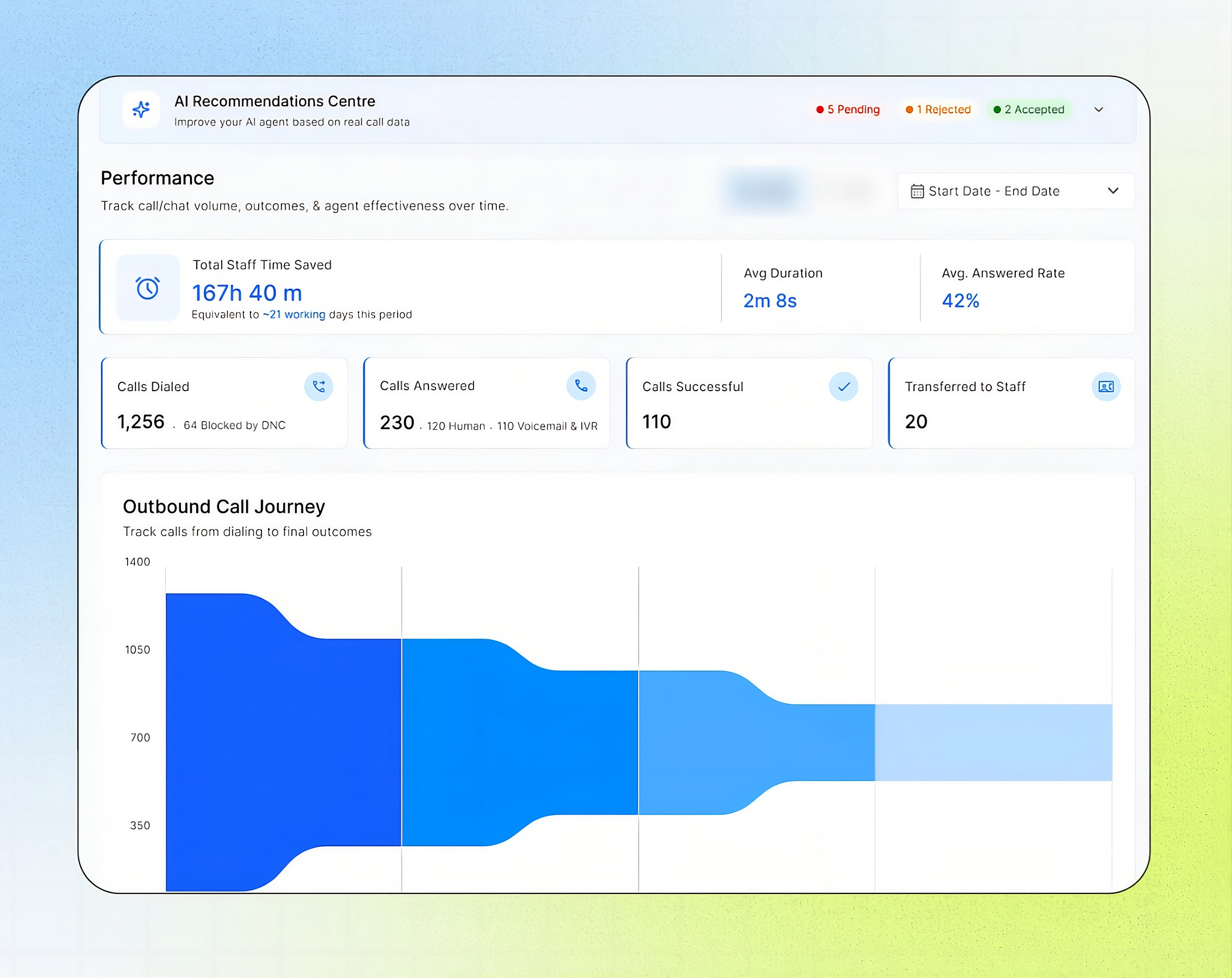
Your AI agent can place hundreds of calls a week. How many reached a real person, and what did it get done once they picked up? The new Outbound Agent Performance dashboard answers both on one screen.

What’s New:

  • Dialing results at a glance: See Calls Dialed, Calls Answered, Calls Successful, and Transferred to Staff for any date range, plus your Average Answered Rate. Calls blocked by Do Not Call show up right beside Calls Dialed.

  • Real people vs voicemail: Answered calls are split into Human and Voicemail & IVR, so you know how many calls actually reached a person.

  • Outbound Call Journey: Follow every call from Dialed to Connected to Answered to Successful, and see exactly where calls drop off. If 1,256 calls were dialed and 985 connected, you can see that 271 calls (22%) never connected, then check the End Reason in Call Logs to find out why.

  • Tasks Completed: See what your agent did while the person was on the line, such as notes taken, patients created, and appointments cancelled or rescheduled.

  • Best hours to call: The Answered Call Rate vs Hours of Day chart shows when people pick up, in two-hour windows, so you can schedule calls when answers are highest and drop the weakest windows.

  • AI Recommendations Centre: Suggestions based on your real call data sit at the top of the page, with counts for Pending, Accepted, and Rejected.

Impact Created:
You stop guessing why outbound calls aren’t landing. Move your calling hours to the windows with the most answers, find the stage where calls are dropping, and measure what your agent completes, all from one dashboard.


Major Enhancements

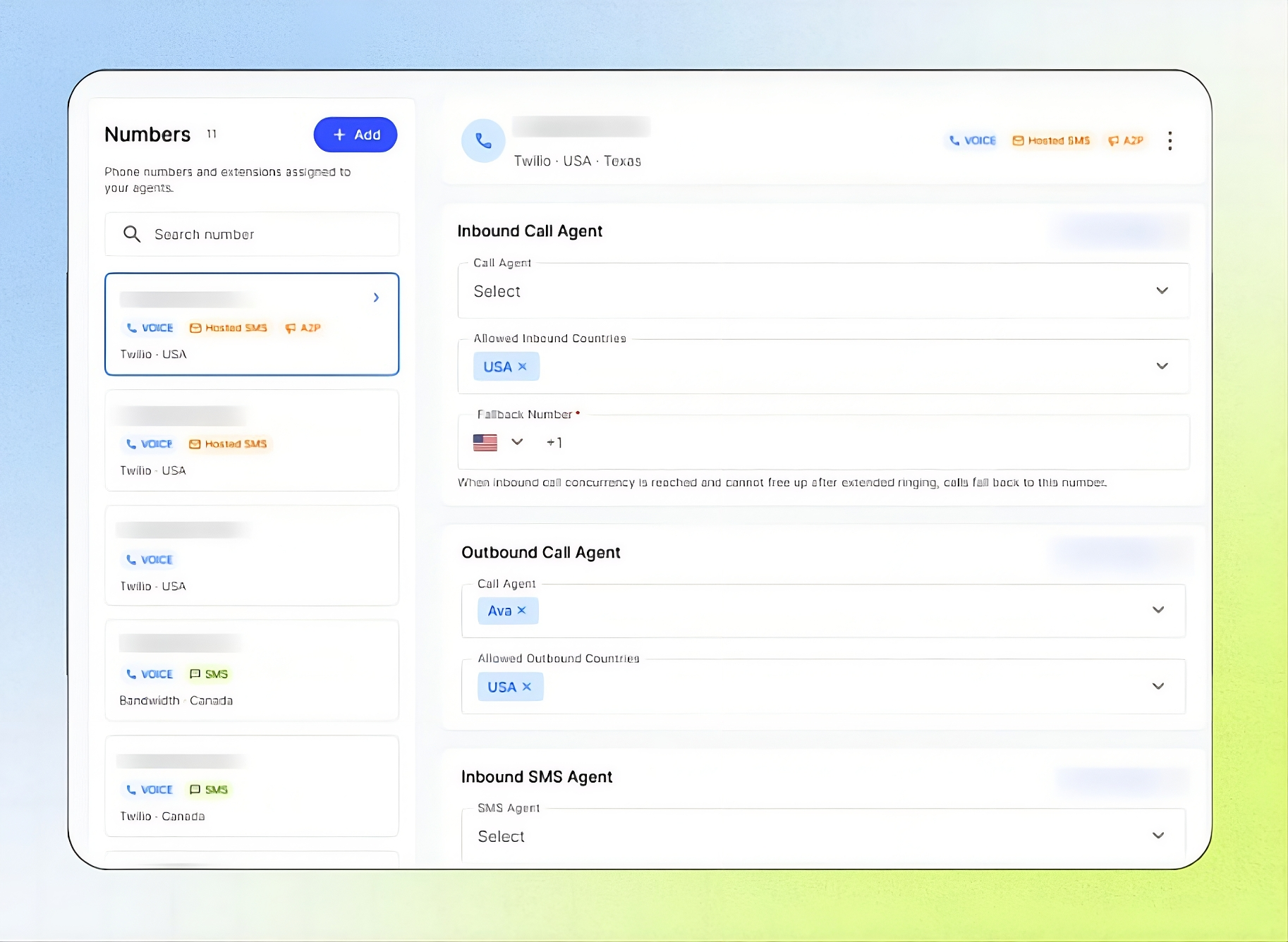
  • A cleaner Telephony page: Every phone number and extension now has its own page under Telephony. From there you can assign the Call Agent and SMS Agent for that number, choose which countries can call in or be called, set a Fallback Number for when all lines are busy, and turn on Host SMS or A2P registration. Add a number by buying a Twilio or Bandwidth number, or connect your own phone system through SIP.

  • Team and Operators, now in one place: Every person in your business now lives on the Team page. Give each member a role: Business Admin, Location Admin, or Operator (no platform access). Set their working hours, breaks, and off days, and your agent checks that schedule before it transfers a call, emails a summary, or sends an SMS. If someone is on a break or on leave, callers hear that the team isn’t available instead of being sent to a phone nobody will answer.

  • SMS your agent sends now counts toward your usage: Text messages your agent sends to callers and to your team members are now counted and billed. Track how much you’ve used on the Usage page, where the SMS bar shows your usage against what your plan includes.

  • Automatic reply when someone texts your business: When a customer sends a text to your business number, your agent now replies with a personalized link to the agent, so they can book or ask their question right away instead of waiting for a callback.

NewBusiness

Earlier updates